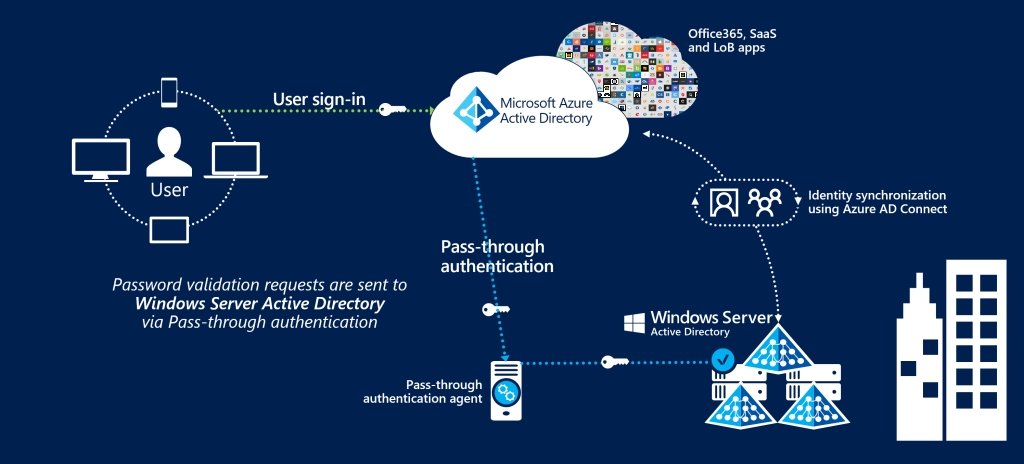
A Hybrid Active Directory environment links your on-premises Active Directory Domain Services (AD DS) with Azure Active Directory, allowing users to authenticate and access both local and cloud-based resources using a single identity.
In simple terms:
-
On-premises Active Directory continues to manage internal users, computers, servers, and legacy applications
-
Azure Active Directory manages access to cloud services such as Microsoft 365, Azure resources, and third-party SaaS applications
-
Hybrid AD synchronizes identities so users experience seamless access across both environments
This setup ensures continuity while enabling a smooth transition to the cloud.
Why Hybrid Identity Matters Today
Modern businesses face challenges such as:
-
Remote and hybrid workforces
-
Growing cybersecurity threats
-
Increasing use of cloud and SaaS platforms
-
Compliance and data protection requirements
Azure Hybrid Active Directory addresses all of these by providing secure, centralized, and flexible identity management.
Key Components of Azure Hybrid Identity
1. On-Premises Active Directory (AD DS)
On-premises Active Directory remains the backbone for many organizations. It provides:
-
User and group management
-
Domain-based authentication
-
Group Policy enforcement
-
Support for legacy and line-of-business applications
-
Control over local network resources
Hybrid identity allows organizations to keep these capabilities while extending them to the cloud.
2. Azure Active Directory (Microsoft Entra ID)
Azure Active Directory is Microsoft’s cloud-native identity and access management service. It offers:
-
Secure cloud authentication
-
Single Sign-On (SSO) across applications
-
Multi-Factor Authentication (MFA)
-
Conditional Access policies
-
Identity Protection and monitoring
Azure AD is essential for accessing Microsoft 365, Azure services, and modern cloud applications.
3. Azure AD Connect
Azure AD Connect acts as the synchronization engine between on-prem AD and Azure AD. It enables:
-
User account synchronization
-
Password synchronization or validation
-
Group and role syncing
-
Device identity synchronization
This tool ensures users have one consistent identity, regardless of where resources are hosted.
How Azure Hybrid Active Directory Works
The hybrid identity process is straightforward:
-
Users are created and managed in on-premises Active Directory
-
Azure AD Connect synchronizes identities to Azure Active Directory
-
Users sign in using the same credentials they already know
-
Access is granted to:
-
Internal network resources
-
Microsoft 365 (Outlook, Teams, SharePoint, OneDrive)
-
Azure-hosted applications
-
Third-party SaaS platforms
-
From the user’s perspective, the experience is seamless and secure.
Benefits of Microsoft Azure Hybrid AD
1. Single Sign-On (SSO)
Users log in once and gain access to all approved resources—both on-premises and cloud—reducing password fatigue and IT support requests.
2. Enhanced Security
Hybrid identity strengthens security with:
-
Multi-Factor Authentication (MFA)
-
Conditional Access policies
-
Identity Protection and risk-based controls
-
Zero Trust security architecture
These features significantly reduce the risk of unauthorized access.
3. Gradual Cloud Migration
Organizations can migrate workloads to the cloud step by step, without replacing existing infrastructure or disrupting operations.
4. Centralized Identity Management
A single identity is used across:
-
Windows devices
-
Cloud platforms
-
Enterprise and SaaS applications
This simplifies administration and improves visibility.
5. Improved User Experience
Employees benefit from:
-
Fewer login issues
-
Consistent access anywhere
-
Better performance and reliability
This directly improves productivity and satisfaction.
Common Azure Hybrid Identity Models
Password Hash Synchronization (PHS)
-
Most widely used and easiest to implement
-
Password hashes are securely synced to Azure AD
-
High availability with minimal infrastructure
Ideal for most organizations.
Pass-Through Authentication (PTA)
-
Authentication requests are validated on-premises
-
Passwords are not stored in the cloud
-
Requires authentication agents
Suitable for organizations with strict control requirements.
Federation (AD FS)
-
Advanced and complex configuration
-
Requires additional servers and maintenance
-
Used in highly regulated or compliance-driven environments
Use Cases for Azure Hybrid AD
Azure Hybrid Active Directory is ideal for:
-
Organizations using Microsoft 365
-
Enterprises with legacy or on-prem applications
-
Businesses with multiple branches or locations
-
Companies requiring advanced security and compliance
-
Hybrid or remote workforces
Security Best Practices
To maximize security in a hybrid identity environment:
-
Enable Multi-Factor Authentication (MFA)
-
Implement Conditional Access policies
-
Monitor sign-in activity and audit logs
-
Apply least privilege access
-
Regularly review synced users and permissions
Azure Hybrid AD vs Cloud-Only Azure AD
| Feature | Hybrid AD | Cloud-Only Azure AD |
|---|---|---|
| On-prem resource access | Yes | No |
| Legacy application support | Yes | Limited |
| Cloud services | Yes | Yes |
| Migration flexibility | High | Low |
| Setup complexity | Medium | Low |
Is Azure Hybrid Active Directory Right for Your Business?
Azure Hybrid AD is the right choice if your organization:
-
Still relies on on-premises servers
-
Wants a phased approach to cloud migration
-
Requires secure access to cloud services
-
Needs enterprise-grade identity and security controls
Conclusion
Microsoft Active Directory Azure Hybrid is a powerful and practical identity solution that bridges traditional IT infrastructure with modern cloud technologies. It allows businesses to enhance security, improve user experience, and adopt cloud services—without abandoning existing systems.
For organizations planning digital transformation, Azure Hybrid Identity is not just a technical upgrade—it is a strategic foundation for the future.

